[1人1P] 4-3. 백엔드 개발 (기능 구현)
![[1人1P] 4-3. 백엔드 개발 (기능 구현)](/content/images/size/w1200/2026/06/-------------2026-06-16-151724.png)
들어가기에 앞서
이전 포스트에서 NestJS에 대한 개괄적인 내용과 API 명세서를 만드는 과정에 대해 작성하였다. 이번 포스트에서는 만들어진 API 명세서를 바탕으로 실제 백엔드 코드를 구현해보는 과정을 작성할 것이다.
백엔드 구성
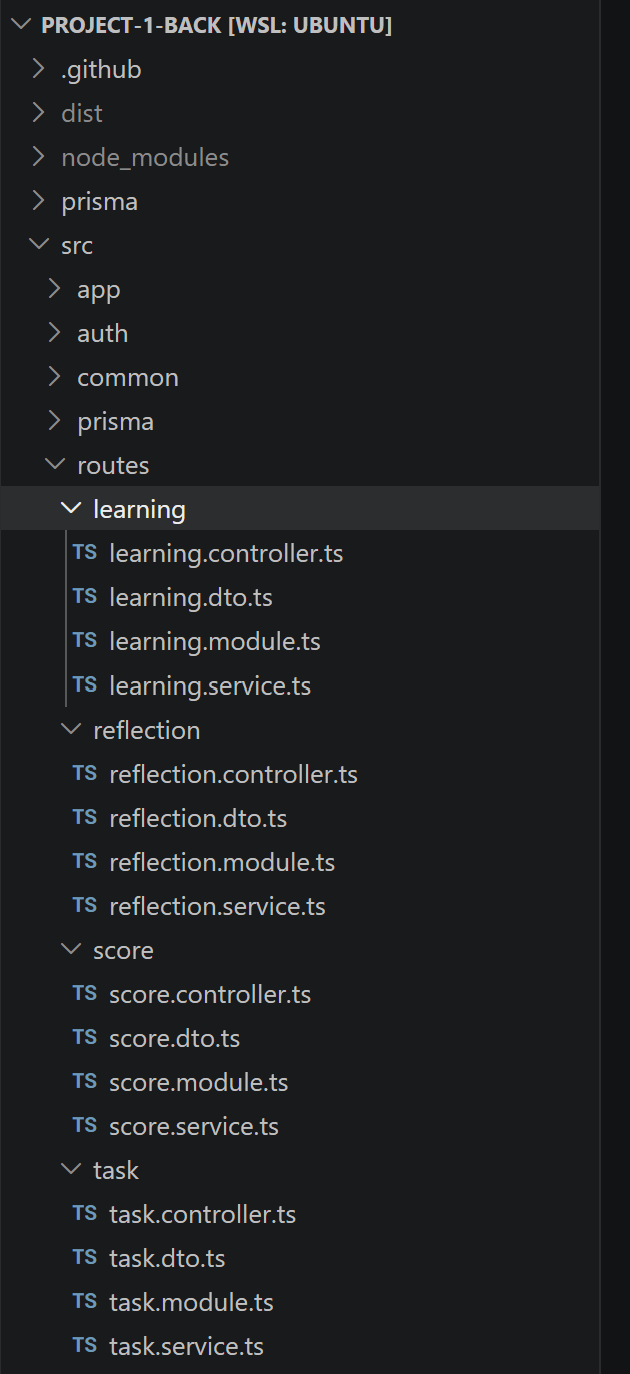
이전 포스트에서 NestJS의 프로젝트 구조에 대해서 설명했었다. 필자는 이번 포스트를 작성하기 전에 API 명세서를 바탕으로 백엔드 코드를 짜두었다.
각 기능의 범주를 learning, reflection, score, task로 분류하고 각각의 기능에 controller, dto, module, service 코드를 생성하였다. 짧게 보고가자.
learning.controller.ts
import { Body, Controller, Get, Post, Query } from '@nestjs/common';
import { CurrentUser } from 'src/auth/decorators/user.decorator';
import { UseGuardsWithSwagger } from 'src/auth/decorators/useguards.decorator';
import { PermissionBit } from 'src/auth/enums/permission.enum';
import { Permissions } from 'src/auth/decorators/permissions.decorator';
import { CustomJwtAuthGuard } from 'src/auth/guards/jwt.guard';
import { PermissionGuard } from 'src/auth/guards/permission.guard';
import { type UserJWT } from 'src/common/types';
import { ApplyStudyTemplateDto } from './learning.dto';
import { LearningService } from './learning.service';

@Controller('learning')
@UseGuardsWithSwagger(CustomJwtAuthGuard, PermissionGuard)
@Permissions(PermissionBit.USER)
export class LearningController {
  constructor(private readonly learningService: LearningService) {}

  @Get('/overview')
  async getOverview(@CurrentUser() user: UserJWT, @Query('date') date?: string) {
    return this.learningService.getOverview(user, date);
  }

  @Get('/review-queue')
  async getReviewQueue(
    @CurrentUser() user: UserJWT,
    @Query('date') date?: string,
  ) {
    return this.learningService.getReviewQueue(user, date);
  }

  @Get('/templates')
  getStudyTemplates() {
    return this.learningService.getStudyTemplates();
  }

  @Post('/templates/apply')
  applyStudyTemplate(
    @CurrentUser() user: UserJWT,
    @Body() body: ApplyStudyTemplateDto,
  ) {
    return this.learningService.applyStudyTemplate(user, body);
  }
}
위 코드를 보면 꽤나 직관적인 코드의 흐름을 확인할 수 있다.
@Get('/overview')를 통해 /overview에 대한 Get 요청이 들어오면 controller는 learningService의 getOverview함수를 실행한다. 실행하면서 url 쿼리의 date 항목ㅇ르 함께 전달한다. 실제 요청 url은 /overview?date=2026-06-01 이렇게 되는 셈이다.
또 재밌는건 class 상단에 @Permissions(PermissionBit.USER)라는 부분이다. 이를 NestJS에서는 '데코레이터' 라고 부른다. @Permissions 데코레이터의 기능은 USER 권한을 가진 사용자만 해당 class의 요청을 실행할 수 있다는 것이다. 권한이 없으면 서버는 Unauthorized 오류를 반환한다. 비트마스크를 이용해서 익명사용자, 일반사용자, 관리자사용자 등 권한을 관리할 수 있도록 만들어진 데코레이터인 것이다.
추가로 아래에는 @Post로 Post 요청을 받아서 처리하는 모습도 확인할 수 있다.
learning.service.ts
async getOverview(user: UserJWT, dateKey?: string) {
    const targetDate = fromDateKey(dateKey);
    const end = new Date(targetDate);
    const start = new Date(targetDate);
    start.setDate(start.getDate() - 6);

    const [todos, timelines, reflections, scores] = await Promise.all([
      this.db.todo.findMany({
        where: {
          userId: user.id,
          date: {
            gte: start,
            lte: end,
          },
        },
        orderBy: [{ date: 'asc' }, { position: 'asc' }],
      }),
      this.db.timeline.findMany({
        where: {
          userId: user.id,
          date: {
            gte: start,
            lte: end,
          },
        },
        orderBy: { date: 'asc' },
      }),
      this.db.reflection.findMany({
        where: {
          userId: user.id,
          date: {
            gte: start,
            lte: end,
          },
        },
        orderBy: { date: 'desc' },
        take: 7,
      }),
      this.db.score.findMany({
        where: { userId: user.id },
        orderBy: { updatedAt: 'desc' },
        take: 6,
      }),
    ]);

...
Service 함수를 함께 살펴보자. 코드가 너무 길어서 controller에서 실행하는 하나의 함수만을 일부 가져와보았다. controller에서 dateKey와 함께 실행된 getOverview 함수는 아래의 코드로 구성된다.
우선 날짜를 파싱한 후에 DB에서 일치하는 데이터를 조회하는 과정을 거친다. this.db.todo.findMany(...)에 해당되는 부분이다. 사용자가 다른 사용자의 정보를 조회하는 것을 방지하기 위해 JWT에서 추출한 userID를 바탕으로 조회한다.
...

return {
      date: todayKey,
      summary: {
        weeklyMinutes,
        weeklyTodos,
        weeklyCompletedTodos,
        todayTodos: todayTodos.length,
        completedTodayTodos,
        reflectionCount: reflections.length,
      },
      daily,
      focusTodos: todayTodos
        .filter((todo) => !todo.completed)
        .slice(0, 5)
        .map((todo) => ({
          id: todo.id,
          description: todo.description,
          collectionId: todo.collectionId,
        })),
      weakSubjects,
      recentReflections: reflections.map((reflection) => ({
        id: reflection.id,
        date: toDateKey(reflection.date),
        title: reflection.title,
        content: reflection.content,
      })),
      recommendations,
    };

...
함수 내부에서는 DB와 사용자에게서 받아온 데이터를 기반으로 응답 요청을 생성한다. 위 코드는 데이터를 최종적으로 클라이언트에게 응답하는 부분이다. 코드가 너무 길어 데이터 파싱 부분은 생략하였지만, 그동안 데이터들을 잘 조작하여 적절한 응답을 생성하는 과정을 거쳤다.
실행
이걸 많이 반복해서 모든 기능의 구현을 완료하였다.
이제 프로젝트를 실행해보자.
[Nest] 1  - 06/10/2026, 1:10:48 AM     LOG [NestFactory] Starting Nest application...
[Nest] 1  - 06/10/2026, 1:10:48 AM     LOG [InstanceLoader] PrismaModule dependencies initialized +62ms
[Nest] 1  - 06/10/2026, 1:10:48 AM     LOG [InstanceLoader] JwtModule dependencies initialized +2ms
[Nest] 1  - 06/10/2026, 1:10:48 AM     LOG [InstanceLoader] AppModule dependencies initialized +4ms
[Nest] 1  - 06/10/2026, 1:10:48 AM     LOG [InstanceLoader] AuthModule dependencies initialized +1ms
[Nest] 1  - 06/10/2026, 1:10:48 AM     LOG [InstanceLoader] LearningModule dependencies initialized +0ms
[Nest] 1  - 06/10/2026, 1:10:48 AM     LOG [InstanceLoader] TaskModule dependencies initialized +0ms
[Nest] 1  - 06/10/2026, 1:10:48 AM     LOG [InstanceLoader] ScoreModule dependencies initialized +0ms
[Nest] 1  - 06/10/2026, 1:10:48 AM     LOG [InstanceLoader] ReflectionModule dependencies initialized +0ms
[Nest] 1  - 06/10/2026, 1:10:48 AM     LOG [RoutesResolver] AppController {/}: +9ms
[Nest] 1  - 06/10/2026, 1:10:48 AM     LOG [RouterExplorer] Mapped {/, GET} route +6ms
[Nest] 1  - 06/10/2026, 1:10:48 AM     LOG [RoutesResolver] AuthController {/auth}: +1ms
[Nest] 1  - 06/10/2026, 1:10:48 AM     LOG [RouterExplorer] Mapped {/auth/login, GET} route +2ms
[Nest] 1  - 06/10/2026, 1:10:48 AM     LOG [RouterExplorer] Mapped {/auth/login/password, POST} route +1ms
[Nest] 1  - 06/10/2026, 1:10:48 AM     LOG [RouterExplorer] Mapped {/auth/login/google, POST} route +1ms
[Nest] 1  - 06/10/2026, 1:10:48 AM     LOG [RouterExplorer] Mapped {/auth/refresh, POST} route +1ms
[Nest] 1  - 06/10/2026, 1:10:48 AM     LOG [RouterExplorer] Mapped {/auth/logout, POST} route +1ms
[Nest] 1  - 06/10/2026, 1:10:48 AM     LOG [RouterExplorer] Mapped {/auth/me, GET} route +1ms
[Nest] 1  - 06/10/2026, 1:10:48 AM     LOG [RoutesResolver] TaskController {/task}: +0ms
[Nest] 1  - 06/10/2026, 1:10:48 AM     LOG [RouterExplorer] Mapped {/task/todo, GET} route +1ms
[Nest] 1  - 06/10/2026, 1:10:48 AM     LOG [RouterExplorer] Mapped {/task/todo, POST} route +2ms
[Nest] 1  - 06/10/2026, 1:10:48 AM     LOG [RouterExplorer] Mapped {/task/todo, PATCH} route +1ms
[Nest] 1  - 06/10/2026, 1:10:48 AM     LOG [RouterExplorer] Mapped {/task/todo/:id, DELETE} route +2ms
[Nest] 1  - 06/10/2026, 1:10:48 AM     LOG [RouterExplorer] Mapped {/task/todo/collection, GET} route +1ms
[Nest] 1  - 06/10/2026, 1:10:48 AM     LOG [RouterExplorer] Mapped {/task/todo/collection/:id, GET} route +1ms
[Nest] 1  - 06/10/2026, 1:10:48 AM     LOG [RouterExplorer] Mapped {/task/todo/collection, POST} route +0ms
[Nest] 1  - 06/10/2026, 1:10:48 AM     LOG [RouterExplorer] Mapped {/task/todo/collection, PATCH} route +1ms
[Nest] 1  - 06/10/2026, 1:10:48 AM     LOG [RouterExplorer] Mapped {/task/todo/collection/:id, DELETE} route +1ms
[Nest] 1  - 06/10/2026, 1:10:48 AM     LOG [RouterExplorer] Mapped {/task/timeline, GET} route +0ms
[Nest] 1  - 06/10/2026, 1:10:48 AM     LOG [RouterExplorer] Mapped {/task/timeline, POST} route +1ms
[Nest] 1  - 06/10/2026, 1:10:48 AM     LOG [RouterExplorer] Mapped {/task/timeline, PATCH} route +0ms
[Nest] 1  - 06/10/2026, 1:10:48 AM     LOG [RouterExplorer] Mapped {/task/timeline/:id, PATCH} route +1ms
[Nest] 1  - 06/10/2026, 1:10:48 AM     LOG [RouterExplorer] Mapped {/task/timeline/:id, DELETE} route +0ms
[Nest] 1  - 06/10/2026, 1:10:48 AM     LOG [RoutesResolver] ScoreController {/score}: +0ms
[Nest] 1  - 06/10/2026, 1:10:48 AM     LOG [RouterExplorer] Mapped {/score, GET} route +1ms
[Nest] 1  - 06/10/2026, 1:10:48 AM     LOG [RouterExplorer] Mapped {/score/:id, GET} route +1ms
[Nest] 1  - 06/10/2026, 1:10:48 AM     LOG [RouterExplorer] Mapped {/score, POST} route +0ms
[Nest] 1  - 06/10/2026, 1:10:48 AM     LOG [RouterExplorer] Mapped {/score/:id, PATCH} route +15ms
[Nest] 1  - 06/10/2026, 1:10:48 AM     LOG [RouterExplorer] Mapped {/score/:id, DELETE} route +1ms
[Nest] 1  - 06/10/2026, 1:10:48 AM     LOG [RoutesResolver] ReflectionController {/reflection}: +0ms
[Nest] 1  - 06/10/2026, 1:10:48 AM     LOG [RouterExplorer] Mapped {/reflection, GET} route +1ms
[Nest] 1  - 06/10/2026, 1:10:48 AM     LOG [RouterExplorer] Mapped {/reflection, POST} route +1ms
[Nest] 1  - 06/10/2026, 1:10:48 AM     LOG [RouterExplorer] Mapped {/reflection/:id, PATCH} route +0ms
[Nest] 1  - 06/10/2026, 1:10:48 AM     LOG [RouterExplorer] Mapped {/reflection/:id, DELETE} route +1ms
[Nest] 1  - 06/10/2026, 1:10:48 AM     LOG [RoutesResolver] LearningController {/learning}: +0ms
[Nest] 1  - 06/10/2026, 1:10:48 AM     LOG [RouterExplorer] Mapped {/learning/overview, GET} route +1ms
[Nest] 1  - 06/10/2026, 1:10:48 AM     LOG [RouterExplorer] Mapped {/learning/review-queue, GET} route +1ms
[Nest] 1  - 06/10/2026, 1:10:48 AM     LOG [RouterExplorer] Mapped {/learning/templates, GET} route +0ms
[Nest] 1  - 06/10/2026, 1:10:48 AM     LOG [RouterExplorer] Mapped {/learning/templates/apply, POST} route +1ms
[Nest] 1  - 06/10/2026, 1:10:48 AM     LOG [NestApplication] Nest application successfully started +335ms
이렇게 서버가 잘 실행되었다. module 파일에서 불러온 여러 코드를 기반으로 각 api route가 잘 생성된 모습을 로그를 통해서 확인할 수 있다.
마치며
이렇게 간단하게 프로젝트의 백엔드 개발을 완료해보았다. 다음엔 프론트엔드 개발을 진행할 것이다.
![[1人1P] 5. 프론트엔드 개발 & 배포](/content/images/size/w720/2026/06/-------------2026-06-16-153412.png)
![[1人1P] 4-2. 백엔드 개발 (API 명세 작성)](/content/images/size/w720/2026/06/-------------2026-06-05-214751.png)
![[1人1P] 4-1. 백엔드 개발 (NestJS 입문)](/content/images/size/w720/2026/03/IMG_8401.jpg)